Registration at Fortuna
While players can play at Fortuna branches without registration, online gaming and betting is available only for properly registered users. Registration, in addition to filling in personal and contact information and verifying identity, primarily includes making a deposit into the player account, from which players will subsequently pay for individual games and bets. For this purpose, however, Fortuna has several payment methods ready.
How to deposit money into the account
Players are prompted to make a deposit almost immediately after filling in the necessary information and verifying it. To gain unlimited access to all services, they must first deposit money into their player account. This can be done through one of the available payment methods, which allow them to make a deposit online or offline directly at a Fortuna branch. It does not matter whether they registered on their website or in the Fortuna mobile app.
Payment cards
Paying with payment cards is among the most popular and fastest online payment methods. Payment this way is immediate and is almost immediately credited to the recipient’s account. You only need to fill in the 16-digit card number, expiration date, and CVV or CVC code from the back and confirm the transaction in the mobile app of the bank to which the card is linked. The minimum amount that can be paid by card is €5 and the maximum is €12,000.
Apple Pay
Owners of Apple devices can make payments using the Apple Pay service, which is already installed on newer mobile devices, as well as Apple Watch, Mac, or iPad. Simply open this app on your device and upload your payment card (credit or debit) to it. This payment method is particularly advantageous if players make a deposit through the mobile app. The limits for payments are the same as for card payments, i.e., €5 – €12,000.
Bank portals
Online payments can also be easily made via bank transfer directly through bank portals on the Fortuna website and in the mobile app. In this case, players simply choose the bank from which they want to send money to their account and enter the exact amount for the deposit. The payment is usually confirmed in the bank’s mobile app by entering a pin code or biometric verification. Here, too, the transaction limits are €5 – €12,000. Payments through bank portals are processed immediately and can be made with the following banks:
- AirBank
- ČSOB
- Raiffeisen Epayments
- Fio Banka
- Komerční banka Moje Platba
- Moneta
- mPeníze
- Platba 24 České spořitelny
- UniCredit
Bank transfer
Owners of bank accounts with companies that do not have an integrated payment portal at Fortuna can make a payment via a classic bank transfer. Simply enter a new payment in your online banking on the bank’s website or in the mobile app and fill in the account number and bank code of the recipient. These payments are usually processed within 24 hours or a few business days and any amount can be sent without restriction.
PayPal
Another popular online method to quickly send money is through the payment service PayPal, which can be used by both registered and unregistered users. In the first case, just enter the registered email address and password and confirm the payment card linked to the account when making the payment. Unregistered users then pay similarly to paying by card, but only enter the email and do not fill in a password. The transaction limits for this payment method are also set at €5 – €12,000.
At the branch
Players who want to deposit money into their account in cash can use any Fortuna branch and ask the staff to make the deposit. After providing all the necessary information, they simply pay the exact amount and the money is almost immediately credited to their player account. However, only an amount up to €400 can be deposited in this way within 24 hours.
Online deposit procedure
-
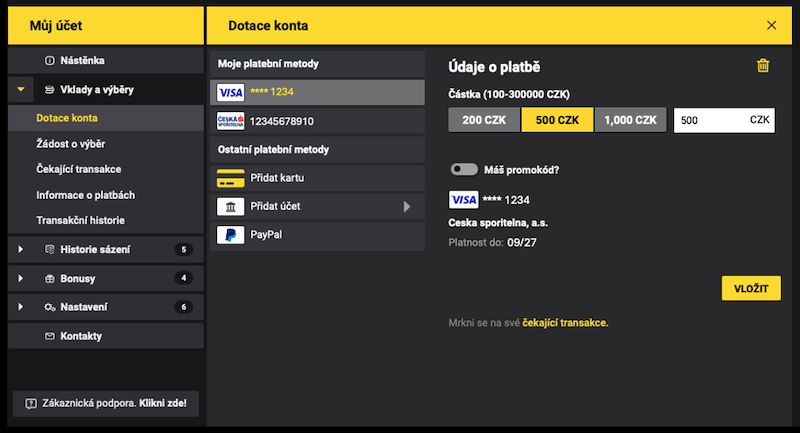
- First, players must log in to their player account on the Fortuna website or mobile app.
- Then they choose one of the offered payment methods and verify their access details according to the instructions.
- Next, they fill in the exact amount they want to deposit into their account in the appropriate field and confirm by clicking the button “Deposit“.
- Depending on the type of payment method, the money will be credited to their account within a few minutes or several business days.
Deposit money without a verified account
Players who have created their profile at Fortuna but have not yet verified their identity through bank identity or at a branch have a so-called unverified profile. To complete the registration and verify their identity, they have a 30-day period from the day of registration. During this time, they can deposit a maximum of €120 into their account, and if they do not verify their identity before the deadline, their account will be canceled and the deposited money returned to their bank account (only up to €120).
Go to Fortuna sportsbook

Comments
Dorothy ·
How many times can I deposit per day?
SlothBet ·
Hello, Dorothy,
you can deposit as many times as you want, as long as each deposit meets the minimum amount.