This content contains affiliate links — if you sign up through them, we may earn a commission. This does not affect our reviews. How we make money
Logging in at Malina Casino is really easy
Malina Casino welcomes players from all over the world and aims to be as accommodating as possible. It offers several currencies, and the website can also be switched to different languages. That said, the site is so well structured that you’ll easily find what you need. In the left column of the main menu, you’ll find Promotions, Casino, Live casino, Sportsbook, Challenges, Tournaments, Bonus Crab, Shop, information about the VIP program, the Help center, and a button to switch the website language. You’ll find similar options in the website footer, plus the casino’s terms and conditions, which you should be familiar with. The Login and Register buttons are located in the top right corner.
When you registered at the casino, you agreed to the casino’s terms and conditions. These state that you should keep your login details confidential to prevent misuse by someone else. When you stop playing, sign out of your gaming account. If you feel that someone else has played on your account, change your password. The casino will not provide any compensation for losses that may have arisen in this way.
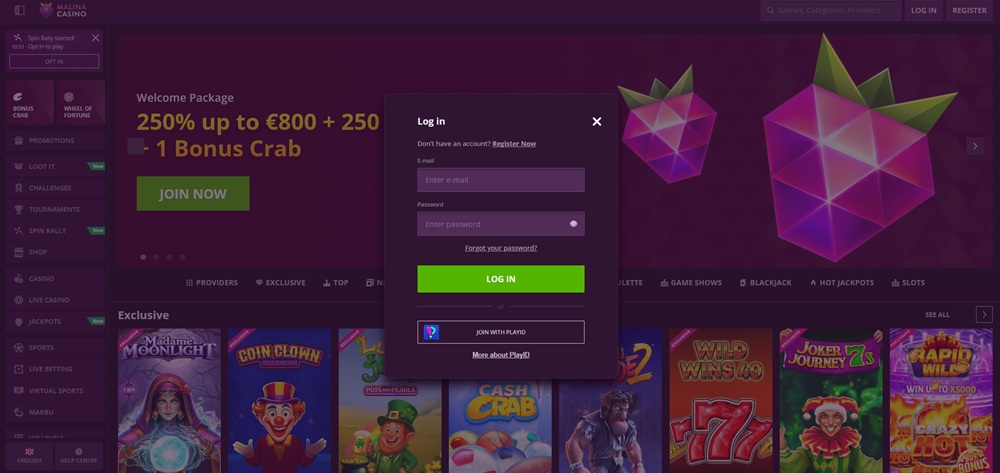
Whenever you want to log in to your gaming account, you must click the button in the top right called „Login“. You need to enter the email you used to register and then your password. Or you can log in via your PlayID account. This is a special app that works as an e-wallet. It combines easier account registration and money transfers (instead of several apps, one is enough). In this wallet you can connect to various online casinos that support this service. To log in, you will need to scan a QR code that appears after you choose the option „Connect with PlayID“.
Logging in to Malina Casino from mobile is just as easy as on a computer because the platform runs via a fully optimized mobile website. Simply open the page in your browser, tap „Login“ and enter your email and password (or use PlayID). The interface automatically adapts to the smaller screen, so the menu, games and wallet remain clear, and loading is usually smooth even during live betting. For the most stable experience, it’s best to use the latest version of Google Chrome (Android) or Safari (iPhone), and to have cookies enabled, as logging in or session storage can otherwise become needlessly complicated.
Forgotten password
If you happen to forget your password, all is not lost. Just click „Login“, then choose „Forgot your password?“ Enter the email you registered with. The casino will send you a message with instructions to reset your password. The whole process only takes a few minutes. Next time you log in, remember that you have a new password!
Forgetting the email you registered with is a slightly more complicated problem. Even in this case, however, you don’t have to worry about losing the money in your gaming account. You will need to contact the casino’s customer support, which will help you find your registered email. For this reason, we recommend that you use an email you actually use when registering, not a one-off disposable email.
Key to successful verification
When contacting customer support about a forgotten email, it is essential to prove that you are the rightful account owner. Therefore, prepare as many verification details as possible, such as:
Full name and date of birth
Exact permanent address
Date of the last deposit and the payment method used (e.g., last 4 digits of the card)
By providing these details, you will speed up the identity verification process, and support will be able to tell you more quickly which email is linked to your account.
The available options can be found in the „Help center“, which is located at the bottom of the left column of the main menu. Here you can see the two ways to reach the casino’s live customer support, as well as a section with frequently asked questions. This can help if you’re looking for an answer to a more general question. You can reach live casino representatives in the following ways:
Live chat: you talk to a casino representative in real time and receive your response within a few minutes.
Email: support@malinacasino.com. Please note that you may have to wait several hours for your reply.
Making your first deposit
Immediately after completing your registration, you will be redirected to a form to make your first deposit. You don’t have to do it right away. If you close the window now, you can open it anytime later via the button in the top right or via the „Wallet“ option in your profile. Depositing funds is simple. First choose a payment method, enter the deposit amount, and submit the request. Then follow the on-screen instructions. However, pay attention to the following:
The casino offers payment methods based on your country of residence. You may therefore not have access to all the payment methods the casino advertises.
If you deposit via the Skrill or Neteller e-wallets, you will not be able to activate the welcome bonus (and some other bonuses).
For crypto welcome bonuses, you need to deposit using the following cryptocurrencies: Tether (USDT), Bitcoin, Bitcoincash, Litecoin, Ethereum, Ripple, USD Coin.
You must respect the minimum amount for each deposit. It varies depending on the payment method you choose. For most e-wallets, you will need to deposit at least €10, and with some cryptocurrencies €10 will suffice. This amount is always shown for each payment method.
By making your first deposit, you open the door to the welcome bonus. Malina Casino offers several of them, so you can choose the one that suits you best. It depends on whether you prefer the online casino or the sportsbook, and whether you favor regular payment methods or cryptocurrencies. Generous welcome offers are ready for all players. Fans of slots can of course also look forward to free spins.
Everyone will find something to enjoy at Malina Casino. The platform works with more than 130 game providers, ensuring a truly rich selection of games. You’ll find several thousand slots of all genres—from classic fruit slots to modern Megaways slots with advanced features. Of course, there are also table and card games, dominated by variants of roulette, blackjack, baccarat, and poker. In the live casino section, you can also try popular game shows like Crazy Time or Monopoly Live.
Betting markets for sports bettors
And if you’re a sports fan, you can head straight to the sportsbook and bet on your favorite teams and events. The offer is not sparse in this respect either. Traditional sports led by football, basketball, ice hockey, and tennis are complemented by other popular sports such as MMA, American football, floorball, or cricket. Esports enthusiasts can bet on matches in games like League of Legends, Starcraft 2, Call of Duty, or Rainbow Six. You can bet on all events both pre-match and live.
Signing out of your account
As soon as you finish playing and leave your device, we strongly recommend signing out of the casino. This ensures that no one can access your account if they gain access to your device. Signing out is very simple. Just click the account icon with the silhouette in the top right corner (or your avatar). A menu will open where you select the sign-out option. After a second, the casino will sign you out, and you can be sure that no one else can get in without your login details. To log back in, just follow the steps described above.
You can deposit funds using payment cards (Visa, Mastercard), e-wallets (Skrill, Neteller, MiFinity, PlayID, Paysafecard, etc.), as well as cryptocurrencies (Bitcoin, Litecoin, Tether, Dogecoin, Ethereum, etc.).
How can I change my account password?
You can either request a reset via the „Forgot your password?“ function, or you can change your password in your profile. There is an „Account details“ section with the option „Personal data“. Once you select this option, a window will open. At the bottom, the „Password“ line contains the „Change password“ option.
How do I sign out of my account?
It’s very simple. Go to your profile. At the bottom, there is the „Sign out“ option.