This content contains affiliate links — if you sign up through them, we may earn a commission. This does not affect our reviews. How we make money
Kyngs offers fast and easy login for all players and bettors
Have you already completed the registration process? Or are you still considering creating your own account on this gaming platform? Either way, it’s worth knowing the exact steps for logging back into your profile. Whether this is your first ride in the royal casino and bookmaker, or you’re a seasoned pro in the world of gambling, you’ll have no trouble navigating this user-friendly and intuitive interface.
Before you can enter Kyngs as a legitimate player and full member of this unique community, you must first create your own profile. This can only be done by completing the registration form. You’ll first choose your welcome bonus and then proceed to fill in the required information. Once you’re finished, just submit the form and continue.
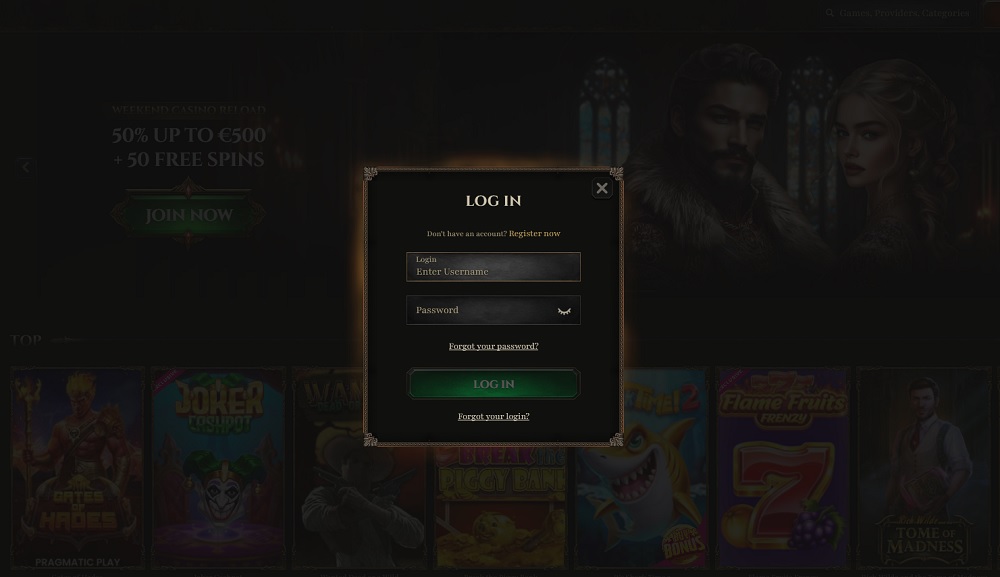
Already registered? Congratulations! From now on, you won’t need the registration form again. Your focus now shifts entirely to the login form. You’ll find this on the Kyngs website in the top-right corner, right next to the registration button. Click the Log in button to open it.
Login credentials at Kyngs
To log back into your player account, you’ll need to enter the login details you set during registration. If you’re logging in from the same device you used to register, your username may already be saved in the form. In that case, just enter your correct password and submit the form. If your username isn’t saved, you’ll need to enter it manually. This goes into the first field, and your password goes in the second. The password must be at least 9 characters long and include at least one lowercase and uppercase letter, as well as one digit.
How to recover your login credentials?
Forgetting your password is not a problem at Kyngs. To continue and log in, you’ll need to reset it. This can be done directly from the login form — just click the Forgot your password? link located below the password input field. Kyngs also allows you to fully recover your login credentials, including your username. For both purposes, simply enter the email address you used during registration. You’ll then receive all the necessary links and instructions to reset your access. In just a few moments, you’ll be back in the game. If login issues persist, you should contact customer support. The support team is available on this platform 24/7 and can help you with most technical issues or unexpected complications. You can reach them via live chat or email at support@kyngs.com.
Make accessing your account easier
Although the platform itself doesn’t allow login details to be stored in the form, that doesn’t mean you can’t use this feature. You can save your login credentials in your web browser — especially the one you’ll use most often to access your account. However, avoid using this feature on public devices or in places where misuse is a risk!
You can make access to Kyngs online casino and bookmaker even easier by installing a website shortcut on your device. This works on any device, whether you prefer playing on a desktop or laptop, or prefer mobile gaming. Just open the platform’s website and click the install shortcut link at the end of the URL bar or in the browser menu next to it.
To log back into your player account, simply enter the username and password you set during registration in the login form.
What should I do if I forget my Kyngs account password?
The platform allows you to easily reset your forgotten password via the link located in the login form. Just enter your registered email address, and you’ll receive all the necessary information to reset your access.
What if I still can't log in even after resetting my credentials?
If you’re having trouble accessing your account, using bonus funds, or experiencing technical issues, don’t hesitate to contact customer support via live chat or the provided email address (see above).