This content contains affiliate links — if you sign up through them, we may earn a commission. This does not affect our reviews. How we make money
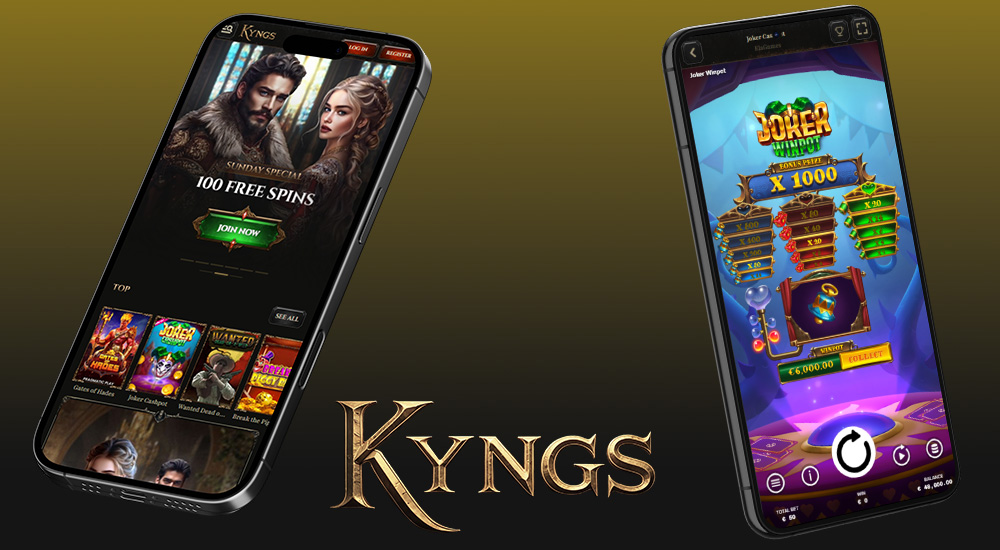
The Kyngs web platform is perfectly optimized and responsive across all mobile devices
This gaming platform welcomes players of all ages and from nearly all parts of the world. And its biggest strength? In addition to an attractive design, sleek graphics, intuitive navigation, and smooth functionality, you can also play on the go — whether you’re commuting, relaxing on a lounger, or just waiting for the bus. Discover how easily you can log into your account from your phone and how little stands between you and winning at Kyngs whenever you want.
Even though it might seem like more and more online casinos and bookmakers have their own mobile apps, that’s not always the case. And Kyngs is one of those going its own way — it currently does not offer an official downloadable mobile app for Android or iOS. Fortunately, that doesn’t mean players can’t enjoy gaming on mobile devices.
Kyngs mobile website
Just like the desktop version, the mobile version of this platform is meticulously designed. And it works just as well. It’s fast, user-friendly, and thanks to optimization, it adapts beautifully to smaller screens. All key features are preserved in this version, including intuitive navigation, crisp graphics, and a seamless gaming experience — anytime, anywhere.
How to play Kyngs on mobile?
Playing at Kyngs on any mobile device is extremely easy. All you need is a web browser and a stable internet connection. Simply open your browser, enter the exact website address or search for the platform, and you’re in. That’s it! No downloads, no installations, and no updates are required.
Add the Kyngs website shortcut to your home screen
Although Kyngs doesn’t currently offer a mobile app, you can add its website to your home screen as a shortcut. In practice, this means you’ll see an icon on your screen that looks just like a regular app. Clicking it will take you straight to the Kyngs website homepage. While this feature doesn’t fully replace a native app, it works as a convenient and effective alternative.
How to install the Kyngs web shortcut on your device
Open your browser and visit the official Kyngs website.
On a PC or laptop, click the install icon at the end of the URL bar to create a desktop shortcut.
On mobile, tap the menu button near the URL bar and look for the option to add the page to your home screen.
Wait a few seconds for the shortcut installation to complete.
Test the newly added Kyngs shortcut to make sure it works.
Registering a new player or logging into an existing account on the Kyngs mobile site is just as simple as on desktop. Just tap the registration button in the top-right corner, fill out some basic personal and contact info, and you’re ready to play. For logging in, just switch from the registration form to the login form instead.
Full game and betting offer also available on mobile
The mobile version of Kyngs has everything you need to play. You can enjoy your favorite slots, classic table and card casino games including live dealer versions, or place sports bets — all from your mobile or tablet. Enjoy full functionality, smooth gameplay, and high-quality graphics without any compromise. Games load easily and play seamlessly for maximum entertainment and winning chances.
There are plenty of benefits to playing on the mobile version of Kyngs. You’re not tied to one place — take your gameplay wherever your phone or tablet goes. With the platform’s responsive website, you’ll have constant access to the full selection of games, generous promo offers, betting markets, account management tools, and customer support. And you don’t have to install any app to do so. In fact, the absence of an app may be its biggest advantage. You’ll save storage space on your device and avoid unnecessary battery usage — many gaming apps consume power even when not in use. You won’t experience slow loading times, lag, or reduced quality. And with a shortcut on your home screen, it might even feel like you have a dedicated app after all.
No, this gaming platform currently does not offer a mobile app for accessing its online casino or bookmaker services.
How can I play Kyngs on my mobile?
To play on your mobile device, all you need is an internet connection and a browser. Just search for and open the Kyngs website — no app download needed.
Can I play game demos at Kyngs on mobile?
Yes, most games at this online casino are responsive and optimized for any device, including demo versions which you can try for free.