This content contains affiliate links — if you sign up through them, we may earn a commission. This does not affect our reviews. How we make money
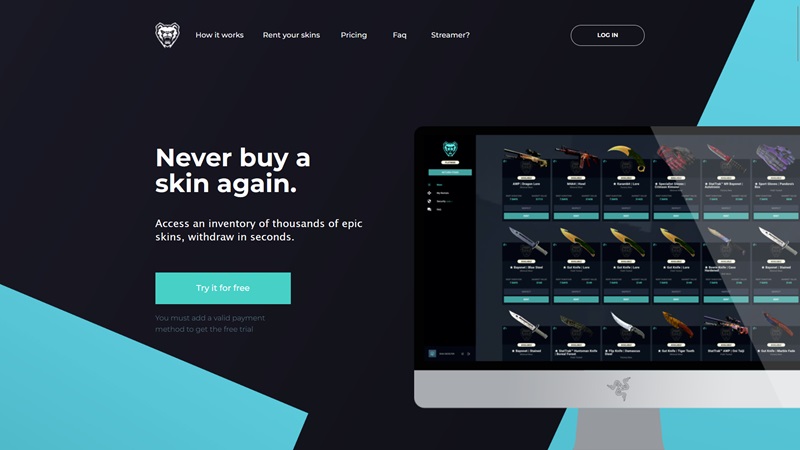
LootBear came up with the revolutionary idea of renting game skins
The Lootbear platform, which was established in 2018, did not become overly popular. It is backed by the company Zengaming, which has, for example, the successful marketplace TradeIt, but Lootbear is not as successful. The website design feels clunky, the marketplace functions do not offer much, and there is not much interest in the main draw of the website – renting game skins.
Especially negative are the high fees for membership and depositing funds. Selling skins can be done instantly, but the buyback prices are set insanely low. The idea of renting is nice, for €20 you can show off a €400 skin on game servers, but after the rental period, you have to send it back. And this is where Lootbear fails. The rental price is quite high and ultimately doesn’t bring you much. It’s positive that you can offer your skins for rent and earn some income from it (though it’s shared with the site), but with low monthly traffic (about 150,000), it doesn’t look like a lucrative business. Lootbear is not a scam, but we do not recommend using it.
Registration
Registration on the Lootbear platform is very simple and can be done using a Facebook account or email address. Before you can access features on the platform, you need to enter your Steam trade url, credit card information (for monthly fees) and verify your identity (KYC process).
Bonuses
The Lootbear platform offers a two-week free period of using its functions. To achieve this bonus, you must complete the entire registration process. Additionally, it is possible to get free skins using the “Invite a friend” program. By inviting people using your link (who must create a full account), you earn coins and can then choose a reward in the form of a free cosmetic accessory. If you are attracted to the excitement of gambling and like to receive bonuses, check out the overview of the best deposit bonuses at casinos.
Payment methods
To fully access all the features of the website, you must pay monthly fees of $24.99 ($16.99 when purchasing membership for six months and $14.99 when purchasing membership for a year). The marketplace (selling and buying skins) can be used without paying these fees, renting cannot. Uploading funds can be done either using payment cards (VISA, MasterCard) or cryptocurrencies (Bitcoin, Ethereum, and LiteCoin). The former option incurs fees of 3% + $0.30, while cryptocurrencies charge 10%. On the platform, you can also immediately sell your CS2 skins and thereby increase your balance. Given the very low prices, however, this is not profitable here. Instead, you can offer your cosmetic accessories for rent and thereby have the opportunity for weekly earnings (depending on the desirability of your skins). The only possible way to withdraw is using Paypal, otherwise you can of course use the funds in your Lootbear wallet to buy or rent skins.
Platform functions
Selling and buying skins
Selling CS2 skins on the Lootbear platform is quite simple and there are three options for selling: instant sell (Sell instantly), sell (Sell), and rent (Rent). The difference between the first two options is mainly in the speed of the sale. Instant sell sells the skin to the platform almost immediately, but the problem here is mainly the low buyback prices. Regular sell lists your offer and it may take a while before someone takes it. For renting, you need to lend the skin to the platform, which holds it and provides it further in case of interest. You receive weekly payouts for providing your cosmetic accessory (based on the rentability of your skin). Buying takes place in a typical manner: you select a skin, pay, and receive a trade offer on Steam.
Renting CS2 skins
Renting is available only to members who have completed their registration and paid the monthly fee. When first using the platform, you can rent only one skin for a certain period, but the more you use the Lootbear website, the more skins you can rent at once. The entire rental process is simple: you select a skin, receive a trade offer on Steam, and once you accept it, your rental period begins. After the period ends (you will be notified by email), you need to send the skin back using the instructions provided.
VIP Program
The Lootbear site does not offer any special VIP program, but by paying monthly fees, all offered functions are opened to you.
Licence
The service provider Zengaming Inc. is a registered company operating in Israel and the USA. It stands behind several successful projects related to game skins (such as TradeIt).
Application
We were unable to find any mobile application.
Contact
Customer support can be contacted via email, which can be found in the footer of the website. You can also send a message using a simple form directly on the website, usually someone will get back to you within four hours.
Best bookmakers for betting on Counter-Strike:
Frequently asked questions
1️⃣ Is Lootbear a scam?
No, the Lootbear platform is not a scam. It is backed by a company with a good reputation and the community views are mostly positive.
2️⃣ Can I withdraw money from the Lootbear platform to a bank account?
No, the balance can only be withdrawn to an online wallet Paypal.
3️⃣ Can I open CS2 crates on the Lootbear website?
No, the website is only a place designated for selling, buying, and renting skins.