Do you already know Safecasino?
Anyone visiting the Safecasino platform for the first time has a lot to look forward to. This gaming world offers both an online casino and live casino. The selection of casino games includes slots, roulette, blackjack, poker, and popular game shows. Quality is ensured by global game providers like Pragmatic Play, BetGames, BGaming, and Play’n GO, thanks to whom every game has its own style, graphics, and bonus features.
Safecasino is operated by GBL Solutions N.V. and runs under a Curaçao Gaming Control Board license, so you can be sure everything is fair, safe, and transparent. Since its launch, this platform has offered not only generous bonuses but also quality customer service and a strong game portfolio. If you’ve never been here before, today’s article will guide you through all the registration steps you need to complete. We’ll show you how to create your own account, how to activate bonuses, and how to navigate the casino and live casino environments.
Don’t forget to activate your welcome bonus during registration
The casino offers new players a welcome package for the first four deposits, which can bring up to €4,000 and 1 200 free spins. It’s your first step to cash rewards and free games. Just deposit as instructed and the bonus is credited automatically. Also remember that all bonuses must be wagered within 30 days, and you’ll find a detailed overview in the “Bonuses” section after logging into your account.
- First deposit: 100% up to €1,000 + 300 free spins: Minimum deposit €10. Spins are credited for Gates of Olympus 1000 (or Gold Rush with Johnny Cash) and their number depends on the deposit amount. The bonus is valid for 30 days and releases gradually.
- Second deposit: 100% up to €1,000 + 300 free spins: The same conditions as for the first deposit. The bonus activates automatically after topping up.
- Third deposit: 100% up to €1,000 + 300 free spins: Play again takes place on the same titles. Spins are awarded according to the deposit amount.
- Fourth deposit: 100% up to €1,000 + 300 free spins: The final part of the package. After depositing, the bonus is credited to your account immediately and you can use it on selected games.
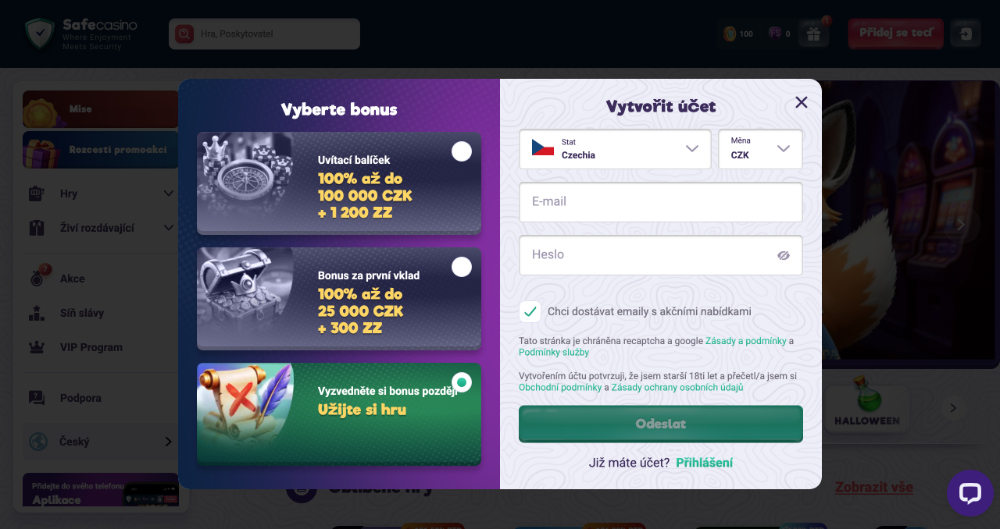
If the casino’s offer has caught your interest, let’s take a look at how to create your gaming account in just a few minutes. The entire registration process is very simple, so you don’t need to worry about getting lost.
- Click the red „Přidej se teď“ button in the top right corner of the site. A registration form will open, where you’ll immediately see the current welcome offer for new players.
- Select your country and currency to play in.
- Enter your email and create a password. You’ll use these details every time you log in. The password must be at least 8 characters long and include one uppercase letter, one lowercase letter, and a number.
- At this step you can also check whether you want to receive promotional emails with bonuses and news.
- By submitting the registration form, every player automatically confirms that they are over 18 and that they agree to the casino’s terms and privacy policy. Then click „Submit“.
With this step, your own gaming account is created, but a few details still need to be added. In your user profile, go to the “Personal details” tab and fill in:
- first and last name,
- date of birth and gender,
- full address including city, street, and ZIP code,
- phone number with country code.
Finally, confirm everything with the „Submit“ button and your account will be ready for full use. At this point, you can log in, activate the welcome bonus, and start playing your favorite games.
Account verification – the final step to fully activating your profile
After completing registration comes the last and very important step – account verification. This process confirms the account really belongs to you and allows the casino to pay out your winnings safely. The casino checks everything through the KYC (Know Your Customer) system, which ensures fairness, safety, and compliance with all rules. Just upload the documents listed in the table below in the “Verification” tab in your profile.