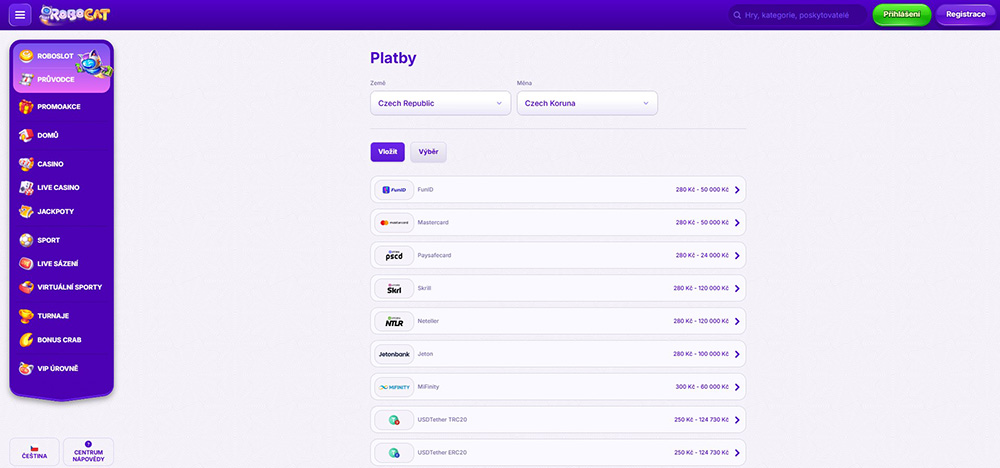
How to top up your account at Robocat?
To gain access to this fun and wild world of gambling waiting for you at Robocat, where money flows freely, you must register on this platform. Only after you create your own player account and deposit money into your account can you dive into any game and chase your luck. You have several supported payment methods available to top up your account or easily withdraw money from it.
Payment methods available at Robocat
Immediately after completing the registration, you will be prompted to top up your player account with money, which will then serve you for placing bets. However, if you decide not to make a deposit at this moment, you can do so anytime upon returning to your profile. Just click on the displayed balance in the upper right corner or the profile icon and find the link “Cashier”.
Paysafecard
The Paysafecard payment method offers prepaid vouchers that allow you to pay online quickly, easily, securely, and partially anonymously. No sensitive information is entered anywhere for payments, only a 16-digit PIN code, which can be printed or generated from the purchased coupon, or a personal PIN code assigned to users of this payment service upon registration.
Payment cards
You can also use payment cards to top up your player account, which remain quite popular among many players. To pay with a payment card, you only need to enter all its details into the payment form and then confirm the transaction on your mobile device. However, payment can be even easier if you save your card in your web browser. In this gaming platform, payments can only be made with Mastercard.
Electronic wallets
Among the most commonly used payment methods, electronic wallets are becoming increasingly popular. This is mainly due to the fact that you can usually have accounts in several foreign currencies simultaneously and many other advantages. To pay, you only need to enter the required details, confirm the money transfer, and within a few minutes, you can be in the game. The available electronic wallets here are Skrill, Skrill 1-Tap, Neteller, Jeton, MiFinity, and FunID.
Cryptocurrencies
As the market for virtual currencies continues to change and grow, it is no surprise that it has also seeped into the world of online casinos and sportsbooks. On the Robocat platform, it is possible to deposit around ten cryptocurrencies into your player account and withdraw them from your account as well, without any fees being deducted from players for the transactions.
Steps to deposit money into your player account
- Log in to your account at Robocat or create a new one.
- Open the deposit window by clicking on the displayed balance or through the “Cashier” section in your profile.
- Select the payment service you want to use to top up your account and enter the exact deposit amount.
- Fill in all required details or scan the QR code and confirm the entered transaction in the app on your mobile device or by entering a verification code.
- Wait for the money transfer to your account to complete.
Withdrawing money from your player account
Just as easily as you can deposit money into your account, you can also withdraw it. Unlike deposits, however, when withdrawing these funds, you cannot use the Paysafecard payment method, which does not allow withdrawals from player accounts. Nevertheless, the range of available payment services is broader here. When withdrawing, you also have the option to use a traditional bank transfer or transfer money via a Revolut account.
Deposit and withdrawal limits at Robocat
Start playing and betting at Robocat
Frequently asked questions