This content contains affiliate links — if you sign up through them, we may earn a commission. This does not affect our reviews. How we make money
To log in to Ocean Spin, you just need the email and password you entered during registration
You probably already know that without registration, you simply can’t play at any online casino. Without an account, you wouldn’t have anywhere to deposit your money, and the casino wouldn’t have anywhere to credit your winnings. Once you create your account, you also need to log in to play. Ocean Spin casino is no exception, and if you don’t log in, you won’t be able to claim its bonuses or play for real money. Let’s take a look at how you can log into your account quickly and easily.
To have an account you can log into, you must first register at Ocean Spin casino. Registration is very simple. Just click on the “Register” button in the top right corner. Then simply fill in the registration form and your account will be created. The entire process is extremely intuitive, and since the casino platform is fully in Czech, you won’t get lost. After that, you can log in to your account anytime and from anywhere.
Once your account is created, the first login happens automatically. Future logins are also very simple and can be done in just a few seconds. If you’re new to the casino world, we’ve prepared a detailed step-by-step guide for you. Thanks to this, you really can’t make a mistake.
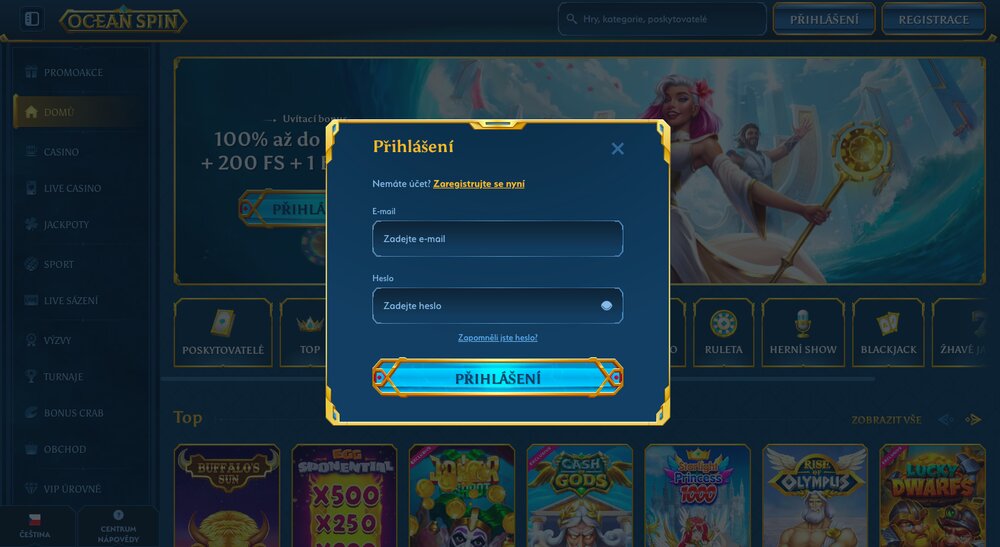
Go to the Ocean Spin casino website and in the top right corner click the blue “Login” button. A window will pop up for entering your login details.
In the first field, enter the email address you used to register at the online casino.
The second field is for your password. When typing, it is shown as dots. To make it easier, click on the eye icon on the right side of the field to reveal the characters.
Once you’ve entered your email and password, click the blue “Login” button. You’ll be taken to your account immediately.
Logging into Ocean Spin casino is really straightforward, and you’ll access your account within seconds. If you’re logging in from the same device or Google account, the casino remembers your email. Next time, you’ll only need to enter your password, which makes the login even easier. Once logged in, you can jump straight into the game. You’ll have access to various slot machines (slots), live casino, a bookmaker, a shop full of extra bonuses, or the popular game Bonus Crab. If you want to log out, simply click the profile icon in the top right corner and choose “Log out” at the bottom of the menu.
We all know how it goes. Even if we think we’ll never forget our password, the moment eventually comes. The same applies to Ocean Spin casino. But you won’t lose your account. If you forget your password, you can easily and quickly recover it. If this has happened to you, don’t worry. Follow our detailed guide below and you’ll have your password back in just a few minutes.
Just like with regular login, click the “Login” button in the top right corner of the platform to open the login form.
Below the email and password fields, you’ll see a smaller button labeled “Forgot your password?” Click on it.
A new window will open where you need to enter the email address you used when registering.
Once you’ve entered your email, click the “Reset password” button at the bottom of the form.
After submitting the form, check your inbox for an email containing a link to reset your password.
Click the link to open the form to create a new password. Enter your new password in the first field, and confirm it in the second.
After setting a new password, click the “Reset and login” button at the bottom of the form, and you can log in with your new password.
If you lose your password again, you can recover it using the same process. Just remember that when setting a new password, you can’t reuse old ones. If you don’t see the reset email in your inbox, be sure to check your spam folder too.
Your casino account contains a lot of sensitive information about you and your payment methods. For your maximum security, it’s important that you don’t share your login details with anyone and don’t allow others to access your account. Otherwise, you risk losing your balance or having your data stolen. Make sure to store your details securely so no third party can access them. If using a public device, don’t forget to log out and delete your login info afterward.
There could be several reasons. First, check that you’re entering the correct email and password. If you’ve forgotten your password, try recovering it first. Another possible reason is account suspension due to missed verification or temporary site unavailability. Try refreshing the page and waiting a moment.
How to reset your password in Ocean Spin casino?
If you’ve lost your password, simply click the “Login” button in the top right corner. Then select the “Forgot your password?” option and enter your email. You’ll receive a link via email that takes you to the password reset form. Enter a new password and you’ll be able to log in again.
Can I log in using Google or social media accounts?
Unfortunately not. Even though login via Google or social networks is common, Ocean Spin casino doesn’t support this option. The only way to log in is by entering your email and password.