This content contains affiliate links — if you sign up through them, we may earn a commission. This does not affect our reviews. How we make money
The Nomini platform unfortunately does not yet offer a mobile app, but that’s no reason to panic; you can use the web browser instead
Nomini is popular among online casino players and bettors. The platform offers a large number of popular gambling games and betting opportunities, along with a sophisticated promo program full of bonuses and special rewards. To make the stay at Nomini as pleasant as possible for players, they constantly strive to improve their user experience and work on all important aspects that affect the quality of play and the time spent on their website. Get acquainted with how to play your favorite games or bet on sports events directly from your mobile device.
Although Nomini is no newcomer to the world of gambling and sports betting, players do not have the option to download and install an app on their mobile device. There is no Nomini app. Therefore, there is no button to download it or any information about such an app on the Nomini website. However, it is important to say that players can easily do without it, whether they own a device with the Android or iOS operating system.
Nomini on mobile devices
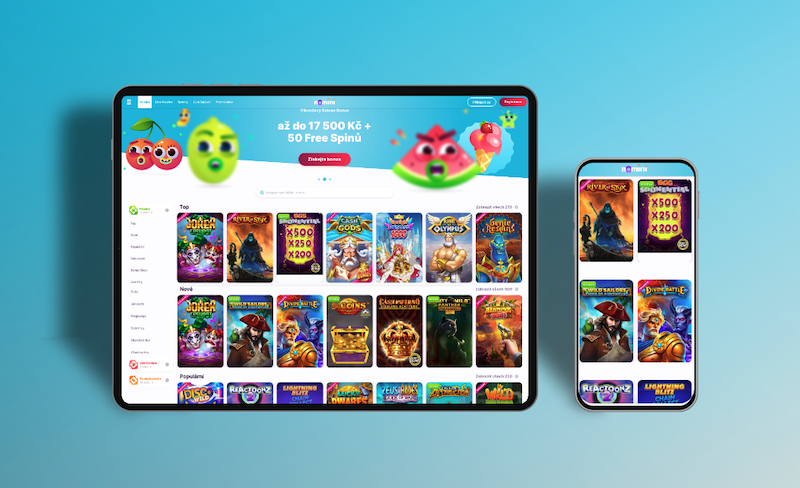
The absence of a mobile app does not mean that all the games offered can only be played on a desktop or laptop. The website, including the games and other parts, is responsive, and thus adapts to the screens of tablets or mobile phones. All players need is a stable internet connection via Wi-Fi or a data package from their operator, and they can connect to the game anytime and anywhere.
Nomini is fully capable of satisfying even the most demanding players and bettors who want to play for money or just enjoy endless entertainment outside their home. Although the desktop version is a necessary foundation for online gaming and betting, the mobile version of the website is an absolute necessity these days. Navigating these websites, as well as operating the individual games and placing bets, is exactly the same as if the players were playing/betting on their computer.
If players want to play any games available in this online casino on their tablet or mobile device or place a bet in the bookmaker section, they simply need to open the web browser application on the given device. Then, they can navigate to the Nomini website through the search engine and enter their login details through the login form. The whole process is exactly the same as logging in through the desktop interface.
The icons for login or registration remain the same, located in the upper right corner in both cases. The complete offer of all tabs is hidden under the menu icon (a column with three horizontal lines) on the opposite side. Once players log into their account, nothing stands in their way to join any of the offered games and play for real winnings or in a free demo version for fun, or to place a bet on a selected event.
Registering at Nomini casino via mobile device
Along with the possibility of logging into the player account and playing all games or placing a sports bet on their mobile device, there is also the option to create a new player account through this device. All players who visit the Nomini website for the first time but would like to play the offered games, place a bet on a selected sports event, or use one of the offered bonuses can easily register via the online registration form within a few minutes.
Want to make your Nomini account even more accessible? No problem! You can do this by creating a shortcut on your phone’s home screen. The exact procedure depends on whether you have an Android or iOS device, but the result is the same. We provide detailed instructions for both types of devices. If you still have questions, don’t hesitate to contact us.
Creating a shortcut on your desktop – Android
Open your web browser (Chrome, Firefox, etc.).
Go to the Nomini platform website.
Tap the three dots icon in the upper right corner.
Select the option – Add to desktop.
Name the shortcut or leave the original name.
Complete the addition by clicking the button – Add.
Creating a desktop shortcut – iOS
Start by launching the Safari web browser.
Open the Nomini website.
Tap the share icon – a square with an upward arrow.
Scroll down the menu and select Add to Home Screen.
Name the shortcut or leave the original name.
Complete the process by clicking the Add button.
What does Nomini offer its players and bettors?
The game selection at this casino is really rich, and every gambling enthusiast will find something to enjoy, whether they prefer slot machines, table or card games. There is also a live casino (Nomini live casino review) full of games with live hosts or dealers that can create an atmosphere as if the players were in a real casino, even though they don’t have to leave the comfort of their home.
For enthusiastic bettors, there is a classic prematch betting section and a live betting section where they can place practically any bets and enjoy the time waiting for the outcome of their bet. The entire offer is complemented by promotions and a bonus program, where players can get extra money, free spins, free bets, and many other benefits they can take advantage of from the moment they register at Nomini and choose their way of playing.
No, Nomini currently does not have a mobile app that players could install on their mobile device to play the offered gambling games or place sports bets.
How to play and bet on Nomini on mobile devices?
The Nomini website is responsive, so its interface adapts perfectly to the screen of the device it is opened on. Thus, players can play and bet on their tablets as well as mobile phones with a stable internet connection.
How to log into Nomini on mobile?
To log into their created account via a mobile device, players and bettors just need to open the web browser app and navigate to the Nomini website. They then log into their profile via the login form just as they would on their computer or laptop.