Don’t have an account yet? Quick setup guide
Before we get to the login itself, you may not have created your AstroMania account yet. On the homepage, click the “Registration” button in the top right corner. A short form will open where you first choose a welcome bonus — for the casino or for sports betting. If you have a promo code, enter it at this step.
Creating login details
Enter the basic information you’ll use to log in:
- email address
- password — it must contain at least one uppercase letter, one number, and be at least nine characters long
Confirm that you are over 18 and agree to the online casino terms. Then click “Next step” and continue to complete your profile.
Completing your personal profile
In the next part of the form, fill in your personal details. It’s important that all information is correct, as you’ll need it for identity verification:
- First and last name,
- date of birth,
- gender,
- residential address (city, postal code, country),
- phone number with dialing code.
Once everything is filled in, confirm by clicking “Create account”. This will activate your profile and you can move on to the next step.
Identity verification (KYC)
After registration, the casino may ask you to verify your account. This step ensures the security of your profile and all transactions. Verification is carried out directly in the user interface under “Account details” in the “Verification” subsection.
Simply upload the required documents and wait for the support team to approve them. The review usually takes 24 to 48 hours. During this period, deposits and withdrawals may be temporarily suspended. Once the process is completed, the account is automatically fully activated.
Documents required to verify your account
To verify successfully, you need to upload a few basic documents. Prepare these files in good quality:
- Proof of identity (ID card, passport, or driver’s license): Must be in color, valid, and legible.
- Proof of address (e.g., utility bill, phone bill, or bank statement): Must be no older than three to six months. The address must match the details provided during registration.
- Proof of payment method (payment confirmation, account statement, or a photo of your payment card): Only the last four digits of the card should be visible. Never send the security code.
- Transaction history (bank statement or e-wallet overview): Covers the last 1 to 3 months. It must be legible and unaltered.
How to log in so you can access your account right away
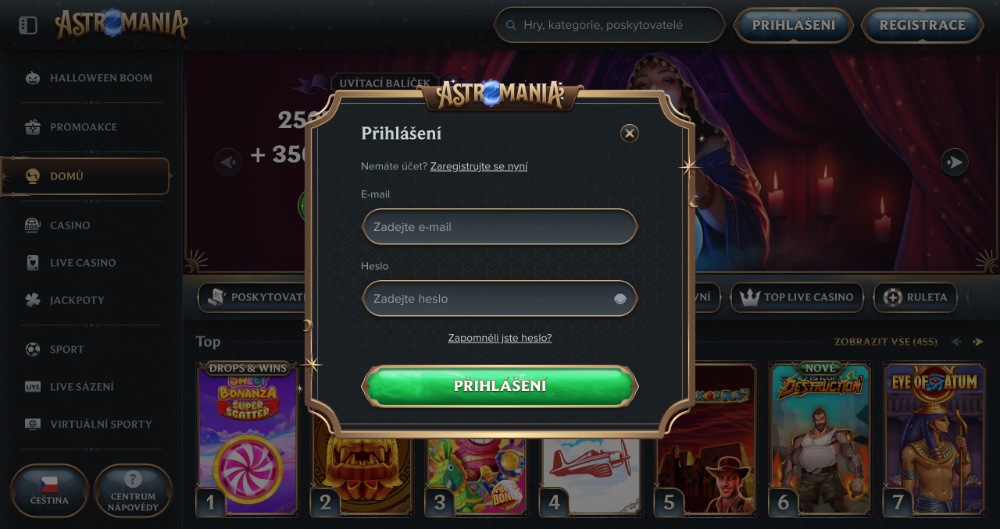
Now let’s look at the main question of this article: how to log in to your AstroMania account. On the homepage in the top right corner, you’ll find a field labeled “Login”. After clicking, the login form will appear, where you enter the details you created during registration.
Enter the email address and password you used when creating your account. Once both fields are correctly filled in, click the “Log in” button and the system will automatically redirect you to your player profile. From there you have access to all games, bonuses, competitions, and the deposits and withdrawals section.
Save login details only on your own device
If you log in to the platform frequently, you can save your login details directly in your web browser so your email and password fill in automatically. We recommend using this option only on your own laptop or computer that no one else can access. Browsers like Chrome, Firefox, Edge, or Safari allow secure password storage.
Never turn this function on on shared or public computers. If you leave your password saved on someone else’s device, someone could easily access your account. After logging in from a public place, always make sure you’ve logged out and that the browser isn’t saving your login details.
Forgot your password? Recovery is really easy and only takes a few minutes
Can’t log in because you forgot your password? No need to worry — many players have been in the same situation. The platform has a simple way to restore access to your account. On the login page, click “Forgot your password?”. A short form will open where you enter the email address you used during registration.
After confirmation, you’ll receive a reset link by email within moments. Once you click it, a page will open where you can create a new password. After the change is successful, return to the login page and sign in with your new password. This process is safe and protected, so you don’t need to worry about your personal data or access to your account.